A Desktop Fiber Laser Engraver can mark small metal parts with crisp detail, but the “best” machine depends on the work you actually plan to do. A nameplate, a batch of stainless-steel tags, and a curved tool handle place different demands on the laser, work area, and fixture. One detail is easy to miss: a larger advertised work field does not automatically produce better results. Focus, material settings, software, and repeatable positioning matter just as much.
Laser pioneer Theodore Maiman is often credited with the line, “The laser is a solution looking for a problem.” For buyers, it is a useful reminder to define the job before comparing machines. Ask which materials you will mark, how large the parts are, and how often production must be repeated. Then compare practical specifications, including source power, lens options, enclosure design, setup support, and service access. Numbers alone can mislead. A compact engraver may suit careful, occasional work, while a production shop may need faster cycles and dependable fixtures. There is no universal winner. This guide examines the trade-offs behind choosing a Desktop Fiber Laser Engraver, while recognizing that published specifications cannot replace a hands-on sample test. Small differences matter.
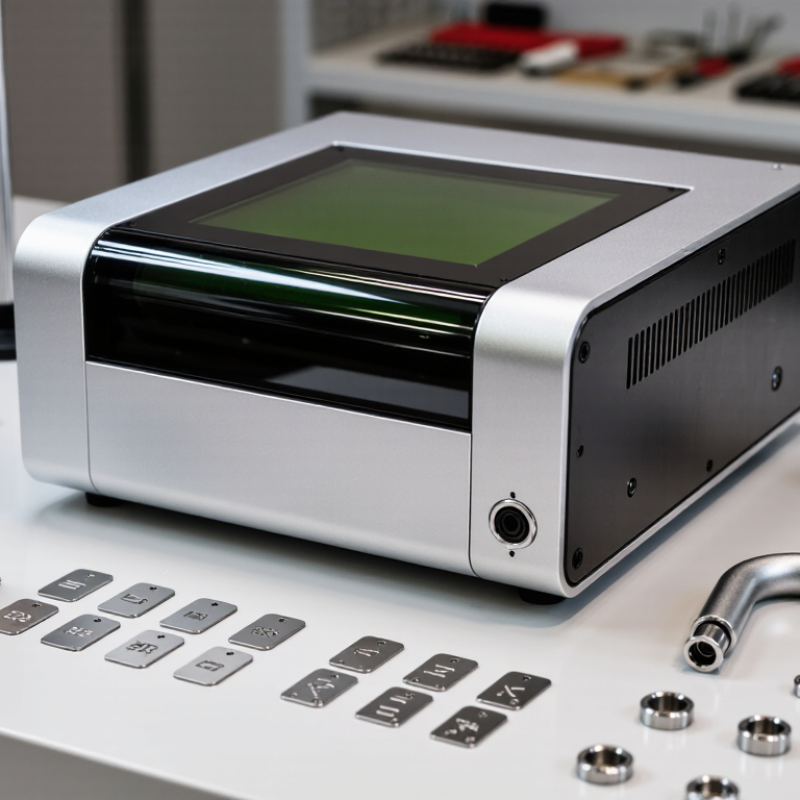
What Is the Best Desktop Fiber Laser Engraver?
A desktop fiber laser engraver depends on several parts working together. The fiber laser source produces the beam, while its power and pulse settings influence marking depth and contrast. The galvo scanner moves small mirrors to guide the beam across the workpiece. An F-theta lens focuses it over a defined marking area. Lens condition matters: dust or fingerprints can soften results, so careful cleaning is important.
Small details matter. A rigid frame helps keep the scanner and lens aligned. The controller and software translate artwork into movement and laser settings; clear previews can help catch misplaced designs before marking. A height-adjustable work surface makes focusing easier, especially when objects vary in thickness. Cooling systems help manage heat, while an enclosure and suitable extraction reduce exposure to laser light, fumes, and particles. Their design should match the machine and materials being processed.
In practice, no single component guarantees a clean mark. A lens with a large working area may provide less detail at its edges, and faster scanning can require different settings. Test on a spare sample, inspect the result under good lighting, and adjust one variable at a time. It is a slower approach, but often a more reliable one.
What Is the Best Desktop Fiber Laser Engraver?
How Fiber Laser Engraving Works
A desktop fiber laser sends concentrated light through an optical fiber to a scanning head. Galvo mirrors steer the beam across the workpiece, tracing letters or fine patterns. Industrial fiber systems commonly operate near 1,064 nanometers, a wavelength in the near-infrared range, as described in technical materials from the Laser Institute of America. The beam’s small, intense spot heats a tiny area in milliseconds. Depending on the metal and settings, it can remove material, melt the surface, or create a dark oxide mark. The effect is not simply “burning.” That distinction matters.
Pulse duration, frequency, and power shape the result. Short pulses can limit heat spreading; longer exposure may leave wider marks or discoloration. A stainless-steel test coupon can reveal this quickly: change one setting at a time, then compare the mark under angled light. Surface oil, coating, and focus also affect contrast. Even a slight height difference can soften a small code. Reports and technical guidance from the Laser Institute of America emphasize that laser output and exposure conditions determine material interaction; a machine’s wattage alone cannot predict mark quality. That is easy to overlook. A desktop unit may engrave crisp text on one alloy, then produce a pale, uneven result on another. Careful testing is part of the process, not a finishing touch.
Desktop fiber laser engravers are best suited to marking metals, not every material found in a workshop. Stainless steel can take crisp dark marks, while aluminum often needs a suitable coating or carefully tuned settings for strong contrast. Brass and other alloys may respond differently, so test a small sample before producing a batch. The first test is rarely perfect.
Common uses include serial numbers on tools, data plates, small instrument panels, and decorative designs on metal accessories. A desktop machine’s compact work area suits small parts, but it can limit larger projects. Marking and deep engraving are also different tasks: deeper cuts may require slower passes and can leave heat discoloration. Check the finished surface under the lighting where it will actually be used.
Material choice matters. Fiber lasers generally work well with many metals, but untreated wood, clear glass, and some plastics are poor or unsuitable matches. Plastic formulations vary, and heating them can release harmful fumes; verify material safety and use appropriate extraction. Keep the workpiece flat, focus carefully, and record settings that produce readable marks. Even then, results can vary between batches. That uncertainty is easy to underestimate.
| Material | Typical Result with a 1064 nm Fiber Laser | Common Applications | Practical Notes | Suitability |
|---|---|---|---|---|
| Stainless steel | Dark marks, bright surface marks, or shallow engraving, depending on settings and finish. | Tools, nameplates, product identification, serial numbers, and barcodes. | A controlled heat-affected surface can produce dark marking; deeper engraving generally requires more passes and may change the finish. | Excellent |
| Mild and carbon steel | Surface marking or shallow engraving; the contrast depends on surface condition and any coating. | Part numbers, tool identification, labels, and component marking. | Rust, scale, paint, and other coatings affect the result. Remove or account for coatings where appropriate. | Excellent |
| Anodized aluminum | Clear, high-contrast marks, often created by removing or altering the anodized layer. | Equipment labels, control panels, tags, and branded-free product information. | Results vary with anodizing color, thickness, and quality. Test a sample to confirm contrast. | Excellent |
| Bare aluminum | Usually a relatively subtle surface mark; contrast and depth can be limited compared with anodized aluminum. | Part IDs, lightweight components, and simple decorative marking. | Alloy, surface finish, and process settings strongly affect readability. Run a material test before production. | Good |
| Titanium | Dark or colored surface marks may be possible; shallow engraving is also possible with suitable settings. | Instrument marking, small components, tags, and durable identification. | Color effects depend on surface condition and heat input. Validate the desired color and durability on a sample. | Excellent |
| Brass and copper | Surface marking is possible, but reflective surfaces can make processing more demanding. | Electrical parts, fittings, small plates, and decorative details. | Use a machine designed for the material and follow its operating guidance. Test for contrast and watch for heat-related discoloration. | Good |
| Coated metals | The coating may be removed to reveal the underlying metal, creating a contrasting mark. | Painted or coated tags, panels, and product labels. | Identify the coating before processing. Some coatings can release hazardous fumes when heated; use appropriate extraction and safety procedures. | Good, coating-dependent |
| Some laser-markable plastics | A contrasting mark may form on plastics formulated for laser marking; ordinary plastics vary widely. | Identification on compatible components, panels, and enclosures. | Confirm the exact polymer and its safety data before use. Do not process unknown plastics or materials that may release hazardous fumes. | Material-dependent |
| Glass, untreated wood, and clear acrylic | Generally poor candidates for direct marking with a standard 1064 nm desktop fiber laser. | These materials are often better handled with a laser type suited to non-metals. | A standard fiber laser is primarily suited to metals and selected plastics. Check the material and laser specifications before choosing a process. | Not recommended |
Suitability is a general guide, not a guaranteed result. Mark quality depends on laser wavelength and power, pulse settings, focus, material alloy, surface finish, and the desired depth. Test on a sample and use the machine enclosure, ventilation, and laser-safety controls specified for the equipment.
Choosing the best desktop fiber laser engraver means comparing measured output, not advertised wattage alone. Check optical power, pulse frequency, spot size, and focus adjustment; together, these affect contrast and fine detail. Test repeatability by engraving identical text on matching metal samples, then compare line width and darkness. Check the stated speed in millimeters per second, but treat peak speed cautiously. It may not reflect consistent results. Small details matter.
IEC 60825-1 organizes laser products into seven classes, a useful safety reference when comparing machines. Many fiber lasers operate near 1,064 nanometers, an invisible near-infrared wavelength. Look for documented laser classification, a protective enclosure, and functioning door interlocks. The U.S. FDA’s laser-product guidance also addresses protective housing and interlocks for higher-class systems. Do not assume a cover alone makes operation safe. Check the specified extraction and filtration, since marking some coatings can release irritating fumes.
Compare work area, rotary compatibility, supported file formats, and calibration instructions. The usable bed should fit your largest parts, plus any fixtures needed to hold them securely. I would value clear maintenance guidance over a flashy speed claim. One caveat: a single sample test can mislead because metal finishes and coatings change the result. Measure twice.
Compare common nominal laser output classes when evaluating performance. Higher wattage can enable faster marking or deeper engraving, but results also depend on the material, lens, and settings.
Safety matters: Look for a fully enclosed design with an interlock and emergency stop. Use wavelength-rated protective eyewear when required, and follow the engraver’s laser classification and operating instructions.
Choosing the best desktop fiber laser engraver starts with the materials and parts you actually handle. Fiber systems are commonly used for marking metals and some engineered plastics, but results vary by alloy, coating, and surface finish. Check the machine’s working area against your largest regular item, not an ideal future project. A 110-by-110-millimeter field may suit small tags, while larger plates need more room. Fit comes first. Inspect the stated laser power, lens options, focus method, enclosure, and extraction provisions. Specifications matter, but real sample marks matter more. Ask for a test on a matching material.
Tips: Request a sample using your exact metal and finish. Confirm the workspace fits your items with room for positioning. Check local service, replacement lenses, ventilation guidance, and safety documentation before purchase. Keep protective covers closed during operation.
For daily use, compare the software workflow, rotary compatibility, and how easily the machine holds focus across repeated jobs. A clear camera preview can help, yet it does not replace careful alignment. Look for stable fixtures and repeatable settings; otherwise, small nameplates can drift by a few millimeters. Check the samples. Verify that the seller documents laser classification and provides suitable user training. Do not choose on wattage alone. A stronger source may shorten cycles, but setup, material response, and mark contrast still affect the result. I would leave some budget for fixtures and extraction; I underestimated those once.
The laser source creates the beam, and galvo mirrors direct it across the workpiece. An F-theta lens focuses the beam. A rigid frame, controller, adjustable work surface, and cooling system also support consistent marking.
Fiber lasers generally suit metals such as stainless steel, aluminum, brass, and other alloys. Results vary by finish and settings. Test a small sample first.
Untreated wood, clear glass, and some plastics are poor or unsuitable matches. Plastic types vary, and heating them may release harmful fumes. Check material safety and use suitable extraction.
Keep the lens clean, focus carefully, and hold the workpiece flat. Dust or fingerprints can soften results. Change one setting at a time, then inspect the mark under good lighting.
Optical power, pulse settings, frequency, spot size, and focus can all affect the result. Deeper engraving may need slower passes and can discolor the metal. A test sample helps, though it may not predict every batch.
Check the documented laser classification, protective enclosure, and functioning door interlocks. Many fiber lasers use an invisible wavelength near 1,064 nanometers. A cover alone does not guarantee safe operation.
Confirm that the material is suitable and review the machine’s extraction and filtration requirements. Some coatings can produce irritating fumes. I would not guess based on appearance alone.
Compare optical power, pulse frequency, spot size, focus adjustment, work area, and calibration instructions. Test identical text on matching metal samples and compare line width and darkness. Peak speed can be misleading. Small details matter.
A Desktop Fiber Laser Engraver uses a fiber laser source, a control system, scanning mirrors, and a focusing lens to direct a concentrated beam onto a workpiece. The beam rapidly moves across the surface, creating marks by changing its appearance through controlled heating. Depending on the material and settings, it can produce text, codes, logos, and decorative patterns. Desktop fiber lasers are commonly suited to metals such as stainless steel, aluminum, and brass, as well as some coated surfaces and compatible plastics.
When comparing machines, consider laser power, marking speed, precision, work area, software compatibility, and the types of materials you plan to process. Safety features matter too: look for suitable beam shielding, an enclosure, interlocks, and clear guidance for ventilation and operation. The best choice is not necessarily the most powerful model, but one that matches your typical projects, available workspace, budget, and experience while offering reliable performance and appropriate safeguards.