0%

A MOPA Fiber Laser Marking Machine uses adjustable pulse settings to mark metals and some plastics with greater control over heat and contrast. That flexibility can help create dark marks on stainless steel, subtle colors on titanium, or fine details on small components. Results still depend on the material, surface finish, lens, and chosen settings. Small differences matter.

This guide looks at seven machines available in 2026, focusing on practical factors such as laser power, pulse-width range, work area, software, cooling, and support. These specifications help narrow a shortlist, but they cannot predict every result on your own parts. A sample test is still important. Even a polished product photo tells only part of the story.

The right choice depends on what you mark each day. A workshop handling small batches may value easy setup and a compact footprint. A production line may need faster processing, reliable integration, and clear service options. This comparison uses manufacturer information and practical selection criteria, while recognizing that configurations can vary by supplier. I would not treat any single model as best for every shop. Check the current specification sheet, ask about compatible materials, and test representative samples before committing.
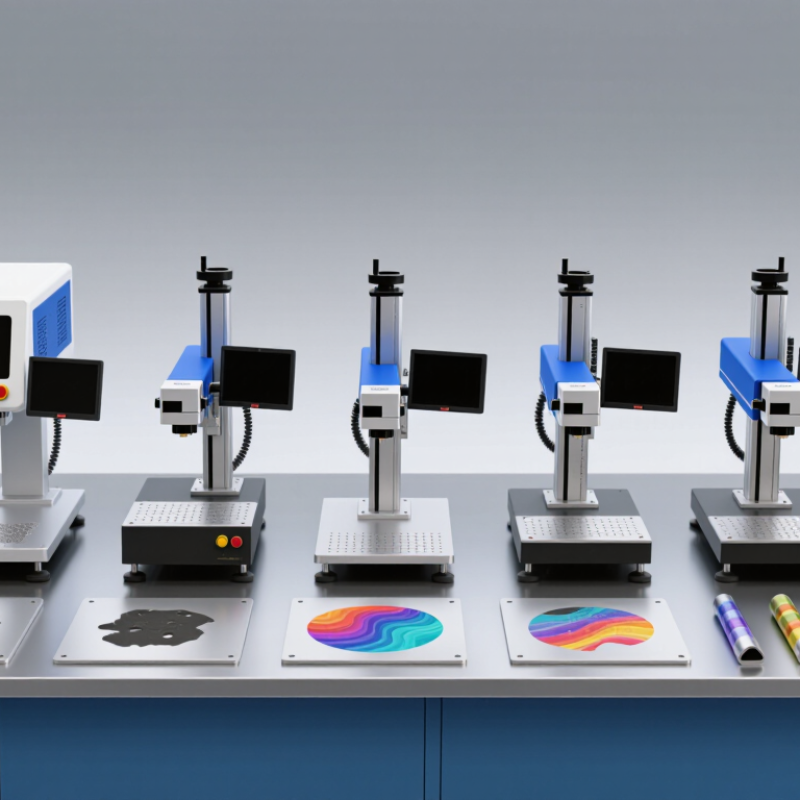
7 Best MOPA Fiber Laser Marking Machines in 2026

How MOPA Fiber Lasers Work: 1064 nm Wavelength and 2–500 ns Pulse Widths

A MOPA fiber laser uses a 1064 nm wavelength to deliver energy to a small area of a workpiece. Its pulse width can often be adjusted from about 2 to 500 ns, depending on the machine. That range matters: shorter pulses deliver energy quickly, while longer pulses spread it over more time. The beam is not doing magic. It is shaping heat.

On stainless steel, carefully selected settings can create colored marks by controlling surface oxidation. Short pulses may help limit heat spread around fine text or small patterns. Longer pulses can suit other marking tasks, but material, finish, focus, and scan speed all affect the result. A setting that works on one metal sheet may disappoint on another. I would not treat a wide pulse range as proof of better performance; test the actual material.

Tips: Start with a clean, flat sample and change one setting at a time. Record pulse width, power, frequency, and speed beside each test mark. Look closely at edges and color under consistent lighting. Small differences matter. And some results need another pass—or a rethink.

MOPA Specifications: Typical 20–100 W Power and 1–4000 kHz Frequency

MOPA fiber marking machines commonly span 20–100 W, with pulse frequencies listed from 1 to 4000 kHz. These figures describe capability, not guaranteed marking speed or quality. A 20 W source may suit fine graphics on coated metal, while higher power can support faster processing or deeper marks, depending on the material and setup.

Frequency changes how energy is delivered across pulses. At lower settings, each pulse may carry more energy; at higher settings, energy is distributed across more pulses, though the exact result depends on the laser design and selected parameters. This range gives operators useful control over color marking, edge definition, and heat input. Small details matter. Lens choice, focus, hatch spacing, and scan speed can change the result as much as wattage.

For a practical comparison, test sample coupons using the intended material and artwork. Check contrast, edge sharpness, and heat discoloration under consistent lighting. I would not choose a machine simply because its frequency reaches 4000 kHz; that number alone does not predict a clean mark. It is an easy assumption to make, and sometimes a costly one. Record settings during trials, since a successful recipe may not transfer unchanged between materials or lenses.

Seven MOPA Fiber Laser Marking Machines to Compare in 2026

Seven MOPA Fiber Laser Marking Machines to Compare in 2026

A practical comparison should look beyond advertised wattage. Consider a 20W desktop unit for fine text, a 30W general-purpose model, and a 60W system for faster production. A 100W configuration may suit deeper engraving, while compact air-cooled machines save bench space. Enclosed workstations add a controlled marking area, and rotary-ready systems handle cylindrical parts. That makes seven useful setups to compare. MOPA pulse control can help create different finishes on materials such as stainless steel and aluminum, but results depend on settings, lenses, and the part itself.

Market growth gives this choice context. Grand View Research estimated the global laser marking market at USD 3.3 billion in 2023 and projected USD 5.71 billion by 2030. Those figures cover laser marking broadly, not MOPA machines alone. Ask suppliers for sample marks on your own material, and compare cycle time, line width, software workflow, warranty, and extraction needs. Check the working-field size, too; a larger field can reduce detail. Small details matter. I would also question impressive speed claims unless the test pattern, contrast target, and production conditions are clearly stated. A demo can look perfect. Real parts may not.

7 Best MOPA Fiber Laser Marking Machines in 2026

A comparison of seven commonly available MOPA fiber laser power classes.

The chart compares representative rated average output-power classes, not specific products or an independent performance ranking. Higher power can improve throughput, but marking results also depend on pulse duration, repetition rate, material, and settings.

Material Capabilities: Black Aluminum, Stainless-Steel Color, and Plastics

MOPA fiber lasers are valued for adjustable pulse duration, which helps control heat on sensitive surfaces. On black anodized aluminum, marking often removes the dark anodic layer to reveal a pale, high-contrast trace. The result depends on coating thickness and consistency. Test a small area first.

Stainless steel can develop color when laser heating forms a thin oxide layer. Small changes in pulse settings, focus, or surface finish may shift the hue. Color is not paint, and it can vary across a large panel. A matte coupon may behave differently from a polished one.

Plastics need more caution. Pigments and additives respond differently; some produce crisp marks, while others melt or discolor. MOPA settings can reduce unwanted heat, but they cannot make every polymer suitable. Check the material specification and run sample tests. Results matter more than presets. Grand View Research’s 2024 laser marking market analysis valued the global market at USD 3.14 billion in 2023 and forecast 8.7% annual growth through 2030. That market data signals wider adoption, not guaranteed results on any particular material. A little uncertainty remains. Use verified samples before production.

7 Best MOPA Fiber Laser Marking Machines in 2026 — Material Capabilities: Black Aluminum, Stainless-Steel Color, and Plastics
Configuration Typical Laser Power Typical Pulse Width Typical Frequency Range Common Marking Field Material Capabilities Best Suited For
Compact MOPA 20 W 20 W About 2–200 ns About 1–1,000 kHz 110 × 110 mm Fine, low-heat marking on stainless steel; can produce color effects on suitable stainless grades. Black marking on aluminum depends on alloy, surface finish, and settings. Some laser-responsive plastics may mark. Small parts, fine text, serial numbers, and low-volume workshops.
General-Purpose MOPA 30 W 30 W About 2–200 ns About 1–1,000 kHz 110 × 110 mm or 150 × 150 mm Versatile stainless-steel marking, including color effects with suitable process settings. Suitable for many anodized-aluminum marks; black results on bare aluminum are material- and process-dependent. Plastic compatibility varies by polymer. Mixed-material jobs, product identification, and general-purpose engraving.
High-Speed MOPA 50 W 50 W About 2–500 ns About 1–2,000 kHz 150 × 150 mm or 200 × 200 mm Faster marking and stronger engraving on metals than lower-power configurations. Can create stainless-steel color marks and dark marks on selected aluminum surfaces. Some engineering plastics respond well after testing. Production marking, larger batches, and a balance of speed and detail.
Large-Field MOPA 60 W 60 W About 2–500 ns About 1–2,000 kHz 200 × 200 mm; larger lenses may be available Useful for marking larger metal components and broad layouts. Stainless color marking and aluminum black-marking results depend on the material, lens, and recipe. Plastic marking should be validated on the exact grade. Large workpieces, batch fixtures, and manufacturers needing a wider marking area.
Deep-Engraving MOPA 80 W 80 W About 2–500 ns About 1–2,000 kHz 150 × 150 mm or 200 × 200 mm Higher average power supports faster metal engraving and deeper removal over multiple passes. Can also mark stainless steel for color effects, though color appearance is sensitive to settings and surface condition. Tooling, metal components, and jobs requiring more throughput or deeper engraving.
High-Power MOPA 100 W 100 W About 2–500 ns About 1–2,000 kHz 150 × 150 mm or 200 × 200 mm Designed for high-throughput metal marking and engraving. Stainless-steel color and black-aluminum effects may be achievable, but are not guaranteed across alloys or finishes. Generally less suited to heat-sensitive plastics. Industrial production lines and demanding metal-marking workloads.
Precision MOPA with 3D or Rotary Setup Typically 20–60 W About 2–500 ns, depending on source Typically about 1–2,000 kHz Often 110 × 110 mm or 150 × 150 mm Can mark curved or uneven metal surfaces when equipped with compatible motion or 3D focusing hardware. Stainless-steel color and aluminum dark-marking capability depends on the workpiece and process; plastics require material-specific testing. Rings, cylindrical parts, curved surfaces, and precision work with varied geometry.

Selection note: Specifications shown are representative ranges for MOPA fiber-laser configurations, not guaranteed specifications for a particular machine. Marking results depend on the laser source, lens, settings, alloy, surface finish, and workpiece geometry. Test plastic grades before production, and do not laser-mark PVC because it can release hazardous and corrosive fumes.

Safe Operation and Ownership: Class 4 Laser Risks, Fume Extraction, and Care

Many open-beam MOPA fiber laser setups present Class 4 hazards. Direct or reflected light can injure eyes and skin. Even a brief test may send a beam toward polished metal, a watch, or a tool. Use a rated enclosure, interlocked access, and eyewear specified for the laser’s wavelength and optical density. Eyewear is a backup, not permission to operate with an exposed beam. Keep the beam path controlled. Small habits matter.

Marking can release fine particles and irritating fumes, depending on the material and coating. Confirm materials are suitable for laser processing; check their safety information before marking unfamiliar stock. Position extraction close to the work area, and check airflow before each shift. Replace filters as specified, since a running fan alone does not prove effective capture. Never use odor as a warning system. Some emissions are not obvious.

Careful maintenance protects both people and the machine. Switch off and isolate power before cleaning or inspection, following the operating manual. Check the protective window for dust, haze, or heat marks; clean it only with approved materials. Record filter changes, faults, and lens cleaning dates. It is easy to trust an enclosure too much, especially during routine jobs. Pause when a guard, interlock, or extraction system behaves unexpectedly, and have qualified service personnel assess the fault.

FAQS

How should I compare MOPA fiber laser machines?

Compare power, working-field size, cycle time, line width, software, warranty, and extraction needs. Ask for sample marks on your own material.

What can different power levels handle?

A 20W unit may suit fine text. A 30W model offers general-purpose use, while 60W systems may improve production speed. A 100W setup may suit deeper engraving.

Can MOPA lasers create different finishes?

Pulse control can produce varied finishes on stainless steel and aluminum. Results depend on settings, lenses, and the part itself.

Do compact or enclosed machines offer practical benefits?

Compact, air-cooled machines can save bench space. Enclosed workstations provide a controlled marking area, and rotary-ready systems can mark cylindrical parts.

What should I know about advertised speed claims?

Ask which test pattern, contrast target, and production conditions support the claim. A demo can mislead. Real parts may look different.

What safety measures matter during operation?

Many open-beam systems present Class 4 hazards. Use a rated enclosure, interlocked access, and eyewear matched to the laser’s wavelength and optical density. Eyewear is only a backup.

Why is extraction important?

Marking can release fine particles and irritating fumes. Check material safety information, place extraction near the work area, and verify airflow. Odor is not a reliable warning.

What routine care should operators record?

Isolate power before inspection. Check the protective window for dust, haze, or heat marks, and clean it only with approved materials. Record filter changes and faults. Small details matter.

Conclusion

This guide explains how a MOPA Fiber Laser Marking Machine uses a 1064 nm wavelength and adjustable pulse widths, typically from 2 to 500 nanoseconds, to control how energy interacts with a material. It reviews common specifications, including power levels of 20–100 W and pulse frequencies of 1–4000 kHz, and outlines seven types of machines to compare in 2026 based on their capabilities and intended applications.

The article also considers marking results on black aluminum, stainless steel, and plastics, noting that settings and material properties affect the finish. Alongside performance, it highlights responsible ownership: Class 4 laser systems require careful operation, suitable protective measures, and controlled access. Fume extraction can help manage airborne byproducts, while routine inspection and maintenance support reliable performance over time.

Ethan Parker

Ethan Parker

Ethan Parker is a professional marketing specialist with a strong understanding of the company’s products, their practical applications, and the needs of the customers they serve. He works closely with internal teams to turn product knowledge into clear, useful information, helping readers make......