0%

Choosing a 3-Axis Industrial Laser Cutter starts with the parts you actually make. A machine that looks powerful in a brochure may still struggle with your material thickness, edge-quality targets, or daily production volume. Picture a stainless-steel sheet on the worktable: the cut must stay clean, repeatable, and within tolerance. That is where practical specifications matter.

Professor Reinhart Poprawe is a recognized laser-technology expert and former director of Fraunhofer ILT. I cannot verify a published quotation from him about choosing a three-axis cutter, so I will not present invented words as his. The guide instead follows this editorial principle: “Choose the cutting system around the part, process, and production goal—not the headline power rating.” A useful reminder. It also invites a closer look at how the source, optics, motion system, and controls work together.

This outline will help compare laser type, usable cutting area, supported materials, and thickness capacity. It will also examine accuracy, machine stability, automation, software, maintenance access, and operator training. Ask suppliers for sample cuts on your own material, not only polished demonstration pieces. Check the cut edge under consistent lighting. Review service response times and replacement-part availability. These details can expose trade-offs that a specification sheet misses. No single machine suits every shop. A careful choice begins with clear requirements, honest production data, and a little skepticism about promises that sound too neat.
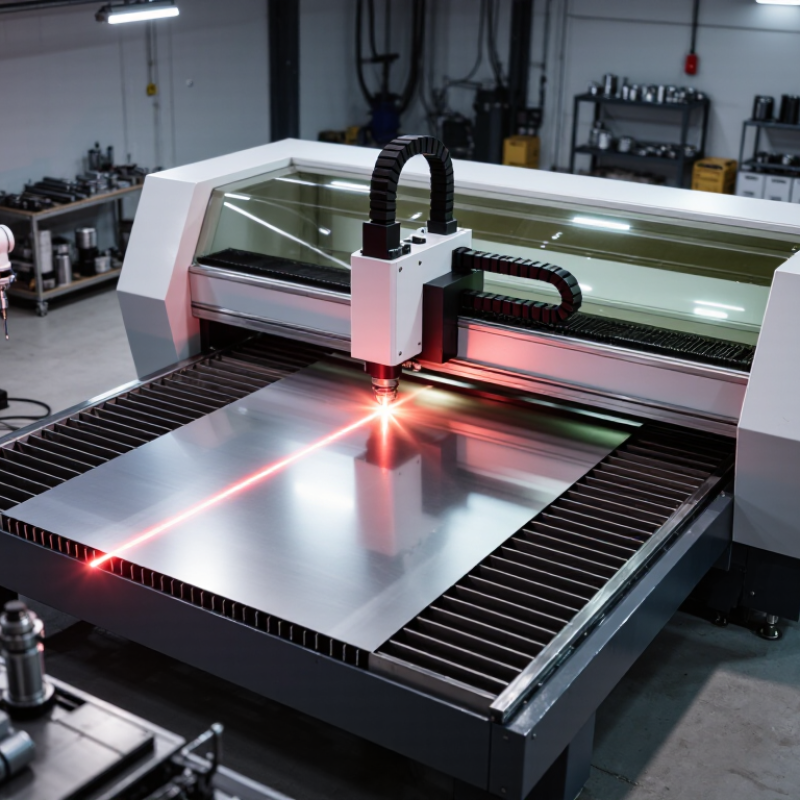
How to Choose a 3 Axis Industrial Laser Cutter

What a 3-Axis Industrial Laser Cutter Does

A 3-axis industrial laser cutter directs a focused beam across a flat sheet. The X and Y axes position the cutting head over the material, while the Z axis adjusts its height. Together, these movements let the machine follow programmed outlines, cut holes, and create slots. The laser heats a narrow path, separating material with controlled motion. Assist gas may help clear molten material from the cut.

The Z axis is more than a simple height control. Correct focus affects kerf width, edge quality, and cutting speed. For example, a steel sheet with slight surface variation may need a different focus setting from a perfectly level sheet. Small setup errors show up quickly. Edges can become rough, or narrow features may not match the drawing. The machine’s suitable materials and thicknesses depend on its laser source, power, optics, and process settings.

In practice, the setup is rarely as tidy as a drawing. Operators check the material, secure it flat, and verify focus before a production run. Test cuts help reveal whether speed and power need adjustment. A three-axis system generally handles flat-sheet work; it does not automatically rotate a part to cut around curved surfaces. That distinction matters when choosing equipment.

How to Choose a 3-Axis Industrial Laser Cutter

What a 3-Axis Industrial Laser Cutter Does

A 3-axis laser cutter moves the cutting head or workpiece along the X and Y axes across the material, while the Z axis moves the head toward or away from it. The chart shows an illustrative sequence of positions in millimeters from an arbitrary work origin; it is not a machine specification. When comparing machines, check their usable travel on each axis against your part size and material thickness.

Which Materials and Cutting Tasks It Must Handle

Choose materials by your real workload, not a brochure’s maximum thickness. A three-axis cutter suits flat-sheet work: profiles, slots, mounting holes, and nested parts. It moves across X and Y while Z follows the sheet. It does not make angled bevels or complex five-axis paths. Small holes matter.

ASM Handbook material-property tables list room-temperature thermal conductivity at about 16 W/m·K for 304 stainless steel and 167 W/m·K for 6061-T6 aluminum. That difference affects heat flow, but it does not predict cut quality by itself. Reflectivity, coatings, sheet gauge, and assist gas matter too. It is tempting to size a machine for the thickest plate; everyday thin parts may deserve more attention.

Tips: Bring sample parts, not just drawings. Test your usual stainless, mild steel, or aluminum thicknesses, then inspect edge dross, hole accuracy, and heat distortion. Confirm the bed fits your largest sheet and that the machine handles your smallest features reliably. Ask for the tested power, gas, and speed settings. A cut that looks acceptable once may still vary across a full production run.

How to Match Laser Type and Power to Your Needs

How to Choose a 3 Axis Industrial Laser Cutter
How to Match Laser Type and Power to Your Needs

Start with the material, thickness, and daily workload—not the biggest power rating. For sheet metal, fiber lasers near 1.06 μm are commonly selected for fast cutting, especially on thin and medium-gauge material. CO2 lasers operate near 10.6 μm and may suit some non-metallic materials, but material response and machine configuration matter. NIST technical references list these characteristic wavelengths. Check the cutter’s tested results on your own material; a clean edge on a sample is more useful than a sales claim. Test real parts.

Power affects cutting speed and the thickness a machine can process, but it also affects operating cost and process stability. A 6 kW source may be excessive for mostly thin sheet, while a lower-power unit can struggle with thick plate or high production targets. The U.S. Department of Energy’s 2022 Industrial Decarbonization Roadmap reports that industry accounted for roughly one-third of U.S. energy use, making electrical demand worth checking alongside output. Ask for cut charts showing material grade, thickness, speed, gas, and edge quality. I would not treat published maximum thickness as a daily production rating; it can be an awkward number to plan around. Allow headroom for real jobs, but match power to the work you actually run.

How to Compare Work Area, Precision, and Motion Systems

When choosing a three-axis industrial laser cutter, match the work area to real parts, not just the largest sheet you expect to process. Measure the longest component, allow room for clamps and loading, then check whether the machine can reach every corner without repositioning. Repositioning costs time and can introduce alignment errors. A little spare space helps, but an oversized bed can waste floor area.

Precision needs context. A quoted positioning tolerance does not guarantee the same result on every material or at every speed. Ask how accuracy and repeatability were measured, and request a test cut using your material, thickness, and smallest critical feature. ISO 230-2 provides methods for measuring machine-tool positioning accuracy and repeatability. Look for test conditions, not just a single attractive number. That detail is easy to overlook.

Motion design matters too. Compare axis acceleration, rigidity, feedback, and how the control system handles direction changes. The International Federation of Robotics reported 553,052 industrial robot installations worldwide in 2022, reflecting broad growth in automated motion systems. It is useful context, not proof that one cutter is better. A fast axis can still produce rough edges if the frame vibrates or settings lag behind movement. Watch a sample job: listen for rattling, inspect corners, and check whether small circles stay round. Real shop-floor results can be less tidy than specification sheets.

How to Evaluate Safety, Software, Support, and Total Cost

How to Choose a 3 Axis Industrial Laser Cutter

When evaluating a 3-axis industrial laser cutter, inspect safety features in person where possible. Check enclosure integrity, interlocks, emergency stops, and extraction around the cutting area. Ask how operators are trained and how routine checks are recorded. Small details matter. A clean demo is useful, but it cannot show every shift condition.

Software affects daily work as much as cutting speed. Confirm that operators can import common design files, adjust settings, and trace jobs without confusing steps. Ask about user permissions, backups, and update support. Run a sample job using one of your own parts. The workflow may feel different on a busy shop floor.

Support and total cost need specific questions. Ask about response times, technician access, spare-part availability, and training after installation. Include electricity, extraction filters, maintenance, software fees, and possible downtime in your estimate. No scorecard is perfect; some costs are hard to predict. Ask for specifics.

Tips: Request a written service scope and a realistic operating-cost estimate. Compare the same material and job across machines. Keep your assumptions visible, and revisit them after a trial run.

FAQS

How do I choose the right laser type?

Start with your material and thickness. Fiber lasers near 1.06 μm often cut sheet metal quickly. CO₂ lasers near 10.6 μm may suit some non-metal materials. Test your own parts.

How much laser power do I need?

Match power to your usual thickness and daily output. High power can raise energy costs, while low power may slow thick-plate work. Bigger is not always better.

Can I rely on a machine’s maximum thickness rating?

Treat it as a reference, not a daily production promise. Ask for cut charts showing material, thickness, speed, gas, and edge quality. Test the actual job.

How large should the work area be?

Measure your longest parts and allow space for clamps and loading. Check that the cutting head can reach every corner. Too much bed space can waste floor area.

How can I check cutting precision?

Ask how positioning accuracy and repeatability were measured. Request a test using your material and smallest critical feature. A single specification number tells only part of the story.

What should I look for in the motion system?

Compare acceleration, rigidity, feedback, and control response. Watch small circles and corners during a sample cut. Listen for rattling. Fast movement alone proves little.

Which safety and software details should I check?

Inspect the enclosure, interlocks, emergency stops, and extraction. Try importing a design file and running one of your parts. The workflow may feel clumsy at first.

What costs should I include beyond the purchase price?

Include electricity, filters, maintenance, software fees, training, spare parts, and possible downtime. Ask for written service terms. Some costs remain hard to predict. Recheck your estimate after a trial run.

Conclusion

Choosing a 3-Axis Industrial Laser Cutter starts with understanding how its three coordinated axes move the cutting head across a flat work surface and determine the shapes and cutting operations it can perform. Begin by listing the materials, thicknesses, part sizes, and production tasks the machine must handle. Then compare suitable laser types and power levels, considering how they affect cutting speed, edge quality, and operating requirements for your intended work.

Next, assess the usable work area, positioning accuracy, repeatability, and motion system to ensure the machine can produce parts consistently. Safety features, control software, operator training, maintenance support, and access to replacement components also matter. Finally, compare the total cost of ownership—not just the purchase price, but also installation, energy use, consumables, upkeep, and downtime. A careful evaluation of these factors helps match the machine to current production needs while leaving room for future work.

Clara Bennett

Clara Bennett

Clara Bennett is a professional marketing specialist with a strong understanding of the company’s products, their practical applications, and the needs they are designed to address. She regularly contributes expert articles to the company website, translating product knowledge into clear, useful......